This class has been so much fun. It was so interesting learning about the different types of technology that you can use in your class, and different ways of using that technology. Some of the stuff we made in this class, I would have never guessed I would be able to create them. Like the robot, and humming bird. I never would have even thought it was possible for me to create something using that technology. So not only was that awesome being able to do something I told myself I couldn't, but having that opportunity and realization that it is not to complicated and that we need to instil that positive thinking in our students.
It was also interesting to see how many subjects that using technology can help. I never though of math being something you really incorporate technology with. But when we talked about our robots and making them move 45 degree angle and 90 degree angle it was fun to see that even those subjects that I didn't think of can involve technology.
I am super excited to use some of these tools in my future class. I am so glad we had the opportunity to write about each of them in our blogs so that later when we do have our own class we can look back on those and reflect, because we will have our own class in about a year and a half. That's lots of time to forget about some of these fun skills and technology that we learned about, so I am very glad we have a place to look back and reflect on. I really do want to use as much of these skills as possible in my class. I feel like for some students struggling it can really help them learn and remember the content of lessons. I also feel like some students do not have very much confidence in the basic Math, Reading, and Science, but maybe they feel confident in making a robot, or creating a video and I feel like we should reach all our students strong points so they can build their confidence in other aspects as well.
I am looking forward to the rest of the program and ways we can use what we learned in each of those classes as well.
Wednesday, May 2, 2018

Wednesday, February 28, 2018
UDL Engagement
- How will WebQuests help your students? I feel like it will help them in a way of having everything organized, and also having everything online so that they can access it anytime. The world is only getting more and more technological. So I feel like using it like this would be very beneficial. For those of you that do not know what a WebQuest is the definition found on google states: "A WebQuest is an inquiry-oriented lesson format in which most or all the information that learners work with comes from the web. These can be created using various programs, including a simple word processing document that includes links to websites" So I think it would also be helpful for chronically ill students that might miss a lot of school, because they would be able to log onto a computer and be able to complete assignments and learn just the same as if they were in the classroom. Or even if a students family is going on a longer vacation, the student would be able to complete homework and learn the lessons so they would not get behind. I also like how it leaves a responsibility to the students to work at their own pace, and to get assignments done, and to be able to learn and search for the answers to questions themselves.
- What are your goals with regard to this topic? I am a big fan or trying to accommodate to as many students as possible. So the fact that I could create WebQuests for students who are sick and miss school and do not want to get behind would be great. I also like this because I feel like a lot of parents are always wondering what is being taught and how, so this would also allow parents to get on and also see what their child is learning. I do want to make a handful of WebQuest's so that if I do have a student who is sick for a long period of time that I could get them the information they needed to stay with the class and not fall behind. I know it can be a lot of work on the teachers part but I do feel like it is important. Again I do also like that it helps students with discovery and how to find answers to problems themselves.
- How does this shape your vision for empowered learning for your students? It gives the students a lot of responsibility to keep up with the learning and to do the assignments. I do feel that is important because that is a lot of what you do in college and also just in general in the real world. It is helping them become problem solvers and to search for the answers on their own. I like that students are able to go faster if it is an easier subject for them, or vise versa that students can repeat videos, or re-read content if they do not get it the first time, or if they are having a harder time understanding it.
I found this website that had a bunch of free WebQuest lesson plan ideas. I definitely want to save this site because it is full of great ideas and free printables!
https://www.teacherspayteachers.com/Browse/Price-Range/Free/Type-of-Resource/Webquests

Wednesday, February 21, 2018
Why Coding?
- How can this be effectively integrated into your teaching? The world is becoming more reliant on technology. It helps with problem solving as well. I liked how during class we talked about how it incorporated the core, like Math. Also gives students the opportunity to show what they have been learning about in a fun and creative way. I do feel however that this would be an activity for the older grades. A chance also for those students to show off a talent of maybe already knowing how to code, or seeing that it comes easy to them, and they develop that talent that they did not know they had.
- How will this help your students? This will help them make the lesson they learned more memorable. Gives them a chance to have fun, and get creative. by still showing that they have learned something. Reminds me of the Social Studies Robot assignment we did. We showed our knowledge of native Utah animals in a fun creative way. You could do this with the hummingbird robot as well. I also think this could be a HUGE confidence boost for the students. Because I know myself when we started pulling out cords, mother boards, and different types of motors and sensors, I straight up told myself I was not going to be able to create a robot and figure it out. But as we were taught, we were able to figure it out, and it was and is cool to be able to say that I created a robot. I don't think many people can say that they have.
- What are your goals with regard to this topic? I would like to mess and play around with it a little bit more. I would not really use this particular robot with students 3rd grade and under, just because me as a 24 year old was having a hard time figuring out the commands and such. I feel like maybe the 4th grades could figure it out, that the 5th grades would probably be able to do it too. But if I had 6th grades I would do it with them and have them play and mess around with them and be able to create something with them.

This is our Hummingbird Robot Elli the Elephant. She was connected to a sergo that made her trunk swing back and forth.
Thursday, February 15, 2018
UDL Action & Expression (Summative)
How can effectively integrate Finch Robots into your teaching?
I feel like this is easy enough that younger grades could also use the Finch Robots. I think you just create your lesson age appropriately and your expectations also age appropriately and you can use the same app. from grades 1st-12th. Obviously the 12th grades Finch Robots are going to be more complex, then the 1st grades who were more simple.
What are your goals with regard to this topic?
I think this topic helped me step back and see that there are so many different ways we can assess our students knowledge of a subject. That we can do fun assessments that require creative thinking and problem solving, and that by doing so you are incorporating so much more into that lesson. Like you brought up with our Finch Robots, we were using Social Studies, Arts, English (Writing), and even Math. So I thought it was fun to see all the different things you can connect these assessments too.
How does this shape your vision for empowered learning for your students?
I feel like it helped me see that our students are capable of doing so much more than just writing a paper, or giving them a test to assess them. I know that for myself when you told us we were going to create this robot and make it move and talk, that I started thinking, "no way. I can't do that. This is way to hard, and I have never messed with this stuff before." But as you demonstrated, and showed us the app. to do so, it made more sense and I was able to change my attitude and start positive thinking like, "This will be fun! I have learned something new! This is not as hard as I thought it would be." I feel like this class is so great in showing us that you can take this creating robots and making them move, and talk and simplifying it to fit your classroom and making it age appropriate. It is nice to push your students to create things they never thought they could so I really enjoyed making our robots.
https://drive.google.com/file/d/1rKwgk8JW7rNtkfyj1s3FLv_DM82nDIR4/view?usp=sharing
I feel like this is easy enough that younger grades could also use the Finch Robots. I think you just create your lesson age appropriately and your expectations also age appropriately and you can use the same app. from grades 1st-12th. Obviously the 12th grades Finch Robots are going to be more complex, then the 1st grades who were more simple.
What are your goals with regard to this topic?
I think this topic helped me step back and see that there are so many different ways we can assess our students knowledge of a subject. That we can do fun assessments that require creative thinking and problem solving, and that by doing so you are incorporating so much more into that lesson. Like you brought up with our Finch Robots, we were using Social Studies, Arts, English (Writing), and even Math. So I thought it was fun to see all the different things you can connect these assessments too.
How does this shape your vision for empowered learning for your students?
I feel like it helped me see that our students are capable of doing so much more than just writing a paper, or giving them a test to assess them. I know that for myself when you told us we were going to create this robot and make it move and talk, that I started thinking, "no way. I can't do that. This is way to hard, and I have never messed with this stuff before." But as you demonstrated, and showed us the app. to do so, it made more sense and I was able to change my attitude and start positive thinking like, "This will be fun! I have learned something new! This is not as hard as I thought it would be." I feel like this class is so great in showing us that you can take this creating robots and making them move, and talk and simplifying it to fit your classroom and making it age appropriate. It is nice to push your students to create things they never thought they could so I really enjoyed making our robots.
https://drive.google.com/file/d/1rKwgk8JW7rNtkfyj1s3FLv_DM82nDIR4/view?usp=sharing
Wednesday, February 7, 2018
UDL Action & Expression (Formative)
- How can Principle 2: Action & Expression: Formative Assessment be effectively integrated into your teaching? You can allow students to show you what they already know about a certain subject. If you do those pre assessments, then you do not need to re teach a subject that the students already know, you can spend that time doing something fun and teaching something the students do not know as much about. I like the action formative assessments that we got to play around with in class today. I feel like letting the students use some of these tools can help them gain and even deeper understanding of a subject. I would love to let my fast finishers do a lot of these tools to express what they have learned. Sometimes I feel like its harder to let the slower learners do some of these tools so maybe having them buddy up with someone who is a little faster can help with that.
- How will this help your students? Like I said before I feel like it helps them gain a deeper understanding of a subject. But I also think that it helps a lesson be memorable to those students. They get to be proud of something they have created. And in doing so with the buddy system, helps them learn how to work with others, and maybe helps them teach another person, or learn from another person something about the subject that maybe they had not thought of before.
- What are your goals with regard to this topic? My goal is to let the students do a fun action formative assessment as often as we can. I know sometimes it is hard because you have so many things you need to teach and test students on but allowing them to do these fun assessments can help with those students who have test anxiety like I had as a student but still shows what the student knows, just in a different form so they are more comfortable with it.
Here is a ThingLink I created as I could test my students on and have them fill in what the bubbles would say once you clicked on them, to test their knowledge of the Water Cycle.

Wednesday, January 31, 2018
UDL Representation
How can Principle 1: Multiple Means of Representation be effectively integrated into your teaching?
What are your goals with regard to this topic?
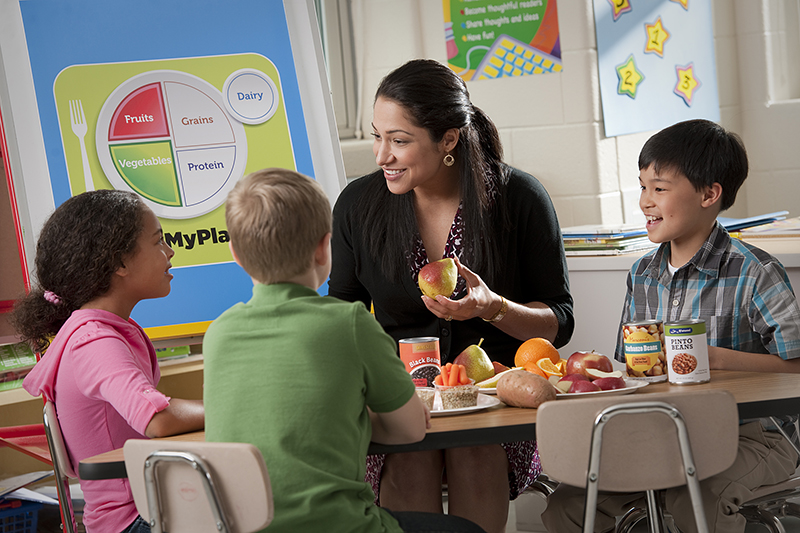 I like this photo and feel like it does a great job of showing multiple means of representation in the classroom. This teacher is teaching about the different food groups and how much of each you should eat each meal. She not only has a graph showing it visually, she is also discussing with them and telling them verbaling. I also like how she actually has food out as well including the students and another mean of representing what she is wanting to teach.
I think http://www.udlcenter.org/aboutudl/udlguidelines/principle1 says it best when they say "Learners differ in the ways that they perceive and comprehend information that is presented to them. ... Others may simply grasp information quicker or more efficiently through visual or auditory means rather than printed text." Because we want to connect to all our students and to teach in a way that they all can learn, we need to use a wide variety of teaching tools, so that all our students are able to grasp and understand a concept that we are teaching whether it be from when we vocally taught it or from showing pictures, or maybe they caught on when we connected it to art.
How will this help your students?
Like I said before it helps those who may have a hard time reading, grasp a concept better when they are being read to. That way they aren't focusing on how hard it is to read, they can focus on the material that is being taught. But then you may have a student who learns better by reading the material themselves, so having both means of learning can help both those students succeed. Helping your students understand and see how they learn also can be so important, so when they understand how they learn best they can take advantage of that for the rest of their lives.
What are your goals with regard to this topic?
My goals for this topic is to have connections on everything I talk about in class. To have multiple resources, so that I can connect to ALL of my students. My goal is to learn to adapt too, if I am not use to teaching a certain way, but one of my students learns best that way, I need to learn to adapt my teaching style and lessons so that I can better accommodate that student, so that I can help them succeed.
I like this photo and feel like it does a great job of showing multiple means of representation in the classroom. This teacher is teaching about the different food groups and how much of each you should eat each meal. She not only has a graph showing it visually, she is also discussing with them and telling them verbaling. I also like how she actually has food out as well including the students and another mean of representing what she is wanting to teach. Friday, January 26, 2018
Digital Citizenship
- Why is it important to teach digital citizenship? I feel like teaching digital citizenship in your classroom is so important. We need them to have that base of security as they use computers and go online. I also feel like this is not just something teachers should teach their students, but rather we teach in addition to the students parents, so they are hearing it again, to show them how important it really is. So I do feel as a parent myself that I need to talk to my children about what is appropriate to post online, and how to use computers. Now days there is so much garbage that is so easily accessible to these young children. They should be taught, that anything you post on the internet, stays there. Even if you delete it a few days later, or even minutes later, it was on there and someone still has access to it. This will affect them for the rest of their life. I also like that we teach them to protect their own privacy. How scary is it that someone can go online posing as someone their age, and they lure them in to get that personal information, and as a parent that scares me. We need to teach them to be safe, because these things are out there and they need to be prepared as to how to handle the situation if they ever find themselves in it.
- How might you teach digital citizenship in an elementary classroom? I feel like just having an open conversation about it. Talk about the importance of respect, show them a cyber bully documentary (there are so many of them) and have the students reflect and put themselves in that situation. How would they feel? Also talk about how what you post is accessible to anyone and everyone, they should never post anything about where they live, and other private information. I think it would be so cool to have a police officer come in and talk about the safety too. A police officer? You may ask. Yes, because they could share a story about people pretending to be someone they are not, and someone of a different age. He could teach them to only accept people's requests if they know them personally, and even then, NEVER give out personal information.

(picture found at https://www.tes.com/lessons/-85xjUXaX7sjHg/digital-citizenship)
Friday, January 19, 2018
Standards and PLNs
I am so excited to use Symbaloo. I haven't gotten it all figured out yet, but love the way it looks, and the fact that you can access so much with and through it.
I am also excited to use the UEN website as well. I Love that it has a calendar on it. I like to see what day it is and to plan things out. I can add assignments that are due, and they are all right there. I like how it has a "tasks" tab. I absolutely LOVE to-do lists. I will be able to write down everything I need to get done and check it off as I complete them. I think it is super helpful that there is a Dictionary right there. Sometimes I have to google definitions so it's nice that it is already right there for you to use.
My Twitter username @MrsWilbur_UVU
My UEN's URL: https://my.uen.org/personal/302127
Tuesday, January 16, 2018
Equity and UDL
- What does the research say about this? Each student is different. Everyone learns different. We as teachers need to be able teach to each of our students on their level. They need to see and know that we care about them so that they feel secure and comfortable in our classroom so they can learn and grow.
- How can this be effectively integrated into your teaching? Helps so that ALL my students are getting what they need to succeed.
- How will this help your students? I think it helps with their understanding if they are not getting my attention that they know someone else is getting it. I also think this is good because fair is not equal.
- What are your goals with regard to this topic? My goals are to make sure I am paying attention to my class, to know who needs what kind of attention. I also want to use this picture to show my class, so that my students will also understand if I am not giving them all my attention, that someone else in the class is getting it and that they are more in need.
- How does this shape your vision for empowered learning for your students? Why wouldn't I want my students to succeed? It makes me as a teach want to go out of my way and spend extra time making sure that my students have what they need to be successful. Makes me excited that I can help make each of my students gain that confidence, and love they need to believe they can achieve anything.

Saturday, January 13, 2018
Introduction
My name is Jacquel Wilbur. I feel like I have been going to school forever. When I was younger I never wanted to become a teacher. As I have gotten older, I realized I loved helping people, children, I like helping people better themselves. I care about people on a deep level. So when I got married, and knew I needed to get my stuff together and finish my education, that I needed to figure out what I wanted to do for the rest of my life... And that is pretty intimidating, I mean it is for the "rest of your life" they say. I started thinking about being a teacher. I knew from the very start that teaching is HARD work. My mother is a teacher and my mother in law is also a teacher. I knew I wanted to be in a career involving children, I love kids and couldn't emagine working a job with just adults, I have tried that before. Can you say BORING! I decided to be a teacher, I was so excited to get back into school, I knew what direction I was going, but boy is going back to school hard work. I took a handful of classes at a time. I then had a baby, and the next semester took all online classes. Which was so helpful and I really enjoyed it, and how awesome was it that I could still continue my education, while figuring out how to be a new mom. THANKS UVU! So here I am, in the program, starting something new. It's all exciting, scary, and I am just so happy to finally be here. The Professors here at UVU have already shown us how much they care about us, and our education. Right now I want to teach the younger grades: mostly 1st or 2nd. I am excited that we get to have field experience and that we will get to experience different grades as well. Because who knows, maybe I will enjoy the older grades more than I think. My end goal is to be a resource teacher in the elementary school. I did some volunteer hours for my exceptional students class a few semesters ago. And I totally fell in love! I already loved working with special needs students as I use to work at a special needs elementary school. I love that it is important to keep those who can function in a regular class, in a regular class. That is why I think resource is so amazing!
My goals for this class, really are to just get 3's on EVERYTHING! I love that we can re-do assignments to get our desired grade. I am excited to learn about more apps, and programs that I will be able to incorporate into my classroom. There are so many fun things you can do with technology.
Here is my adorable son (he is a year and a half) And my AMAZING rockstar of a husband!


Tuesday, April 18, 2017
Mind Mapping:

UEN STANDARDS:
Health education 3rd Grade. Human Development and Relationships Standard 3- The students will understand and respect self and others related to human development and relationships. Objective 1- Summarize and name the functions of the major body systems.
ED-TECH STANDARDS:
Standard 5- Use technology tools for individual and collaborative writing, communication and publishing activities to create knowledge products for audiences inside and outside the classroom. Standard 6- Use telecommunications efficiently and effectively to access remote information and communicate with others in support of direct and independent learning and for pursuit of personal interests. Standard 7- Use telecommunications and on-line resources to participate in collaborative problem solving activities to develop solutions or products for audiences inside and outside the classroom.
ISTE STANDARDS:
Standard 1- Facilitate and inspire student learning and creativity. Standard 2- Design and develop digital age learning experiences and assessments. Standard 3- Model digital age work and learning.
I like using mind mapping. I think this is a fun and creative tool that you can use to display a lot of information in a fun interactive way. I have used this poplet tool before and have really enjoyed it. I like how simple it is and easy to use. It is definitely user friendly. It tells you exactly how to add everything from text video images and anything else you would need to put in your presentation. I would use this tool in my class, to either test students knowledge of subjects and have them create their own, or like I used it today and create a little lesson for a student and then make it interactive by having them match up pictures and questions to answers to test students knowledge of a subject.
News Letter

UEN STANDARDS:
Human Development and Relationships: Standard 3- Students will understand and respect self and others related to human development and relationships. Objective 2- Model behaviors that foster healthy interpersonal relationships.
ED-TECH STANDARDS:
Standard 6- Use telecommunications efficiently and effectively to access remote information and communicate with others in support of direct and independent learning and for pursuit of personal interests.
ISTE STANDARDS:
Standard 1- Facilitate and inspire student learning and creativity
With this tool, it was fun for me to make up my own classroom activities and newsletter. It was fun making up students names. This was a fun tool for me. I feel like the more I mess around with it, the more I will like it. I feel like there is really so much you can do with a newsletter. You can include what ever you like and so you can put in spelling works, homework sheets, birthdays, reminders. One thing I wanted to put in mine was spot light of the week. I feel like this spot light of the week will help students get to know each other and so that they can develop healthy relationships. I would like to do the spot light and then during the week have the students make a card for the spot light of the week also aiding in developing healthy relationships. I feel like newsletters are a good way of letting parents know what is going on in the classroom.
Newsletter for Computer Class by Jacquel Wilbur on Scribd
Sunday, April 16, 2017
Storybird: English Language Proficiency

UEN STANDARDS:
English Language Proficiency: Standard 2- The language of Language Arts (example topics- compound words, elements of story, homophones, phonemic awareness, phonics, rhyming words,...)
ED-TECH STANDARDS:
Standard 5- Use technology tools for individual and collaborative writing, communication and publishing activities to create knowledge products for audiences inside and outside the classroom.
ISTE STANDARDS:
Standard 1- Facilitate and inspire student learning and creativity. Standard 2- Design and develop digital age learning experiences and assessments. Standard 3- Model digital age work and learning.
I did not really see a point to this tool. Definitely not my favorite. Could not choose from a wide variety of pictures. Once I said my subject if only gave me a hand full of pictures to pick from... and I did not like any of them. Wish that it was easier to understand, it was not really user friendly to me. And I do not think that I will use it in my classroom because like I said I see no real point for it. I feel like there are so many other tools that could teach things better than this tool. Not a fan, not gonna waste my time making any more storybirds.
Thursday, April 13, 2017
Animoto: 6th Grade Art

UEN STANDARDS:
Visual Arts: Strand create (6.V.CR.) Students will generate artistic work by conceptualizing organizing and completing their artistic ideas. They will refine original work through persistence reflection and evaluation. Present: (6.V.P) Students will analyze interpret refine and select artistic work for presentation. They will convey meaning in the manner in which the art is presented.
ED-TECH STANDARDS:
Standard 6- Use telecommunications efficiently and effectively to access remote information and communicate with other in support of direct and independent learning and for pursuit of personal interests.
ISTE STANDARDS:
Standard 1- Facilitate and inspire student learning and creativity. Standard 2- Design and develop digital age learning experiences and assessments. Standard 3- Model digital age work and learning.
I liked this tool. It was a very simple tool to use. I feel like this is one I would let my students use as an option to present projects to me. They could use the pictures and explain why they chose them. They could use it as a book report and do pictures that were super important in the book, and then the class could guess what book it was based on the pictures, and then the student could explain why each picture was important to the book. I LOVE that idea! I am going to use that in my future class. I made this project as an art project which is another thing I could see it being used as. You could take pictures like I presented on, but you could also scan your own work in and use them. All in all I really liked this took. I could see how it would be irritating if you were trying to keep it on one slide for long, because I did not see an option to make the slides longer, but in the way that I would use it, I feel like the timing was just fine.
I liked this tool. It was a very simple tool to use. I feel like this is one I would let my students use as an option to present projects to me. They could use the pictures and explain why they chose them. They could use it as a book report and do pictures that were super important in the book, and then the class could guess what book it was based on the pictures, and then the student could explain why each picture was important to the book. I LOVE that idea! I am going to use that in my future class. I made this project as an art project which is another thing I could see it being used as. You could take pictures like I presented on, but you could also scan your own work in and use them. All in all I really liked this took. I could see how it would be irritating if you were trying to keep it on one slide for long, because I did not see an option to make the slides longer, but in the way that I would use it, I feel like the timing was just fine.
Ed-Puzzle: Mathematics Grade 2
UEN STANDARDS:
Mathematics grade 2 Strand: Measurement and Data Standard 2.MD.8 - Solve word problems involving dollar bills, quarters, dimes, nickels, and pennies. Using $ appropriately.
ED-TECH STANDARDS:
Standard 6- Use telecommunications efficiently and effectively to access remote information and communicate with others in support of direct and independent learning and for pursuit of personal interests. Standard 8- Use technology resources for problem solving, self directed learning, and extended learning activities.
ISTE STANDARDS:
Standard 1- Facilitate and inspire student learning and creativity. Standard 2-Design and develop digital age learning experiences and assessments.
This tool was so cool! I loved how you could just make an ordinary Youtube video interactive! You can still use these awesome videos, but now you know your students are paying attention, you know they are getting something out of it, and it is not just "busy work" you can actually give them a quiz during the video. This keeps them paying attention, and makes them answer the question before moving on. I am for sure using this tool in my classroom. I think it is so much fun.
I did a lesson using math and money. I decided to do this because I have not done a Math lesson in any of my other tools that I have learned to use. So I thought it was fun and I did like how it turned out you could easily have a video ready for a student who was maybe absent when you taught a math lesson and they can watch it during reading time and get caught up easily and quickly. And you would be able to see if they were caught up and understanding it with the quiz during the video. You could even use it for students that maybe need to be taught the lesson twice because they have a harder time catching on. But I definitely loved this tool and will be using it in my classroom!
Tuesday, April 11, 2017
Thinglink: 5 Senses
UEN STANDARDS:
Kindergarten-content. Standard 1 Objective 2 : Develop skills in gross and fine motor movement.
ISTE STANDARDS:
Standard 1- facilitate and inspire student learning and creativity. Standard 2- Design and develop digital age learning experiences and assessments.
ED-TECH STANDARDS:
Standard 5- Use technology tools for individual and collaborative writing, communication, and publishing activities to create knowledge products for audiences inside and outside the classroom. (3,4) Standard 6- Use telecommunications efficiently and effectively to access remote information and communicate with others in support of direct and independent learning and for pursuit of personal interests.
I thought this tool was so much fun. It did take me a while to figure out how to put a picture on the background. But once I figured it out it was a smooth process to make this cool presentation. I feel like this is a fun activity that the kids can be a part of, they can click on what they want to learn next. It makes it interactive.
So I did the 5 senses lesson. This was part of the Kindergarten standard 1 objective 2, in this lesson it said that the students should have a background knowledge of the 5 senses, and that maybe you should do a review. So I feel like this organized Thinglink is the perfect way to review the 5 senses. I thought this was a fun one because the kids could predict what sense they were going to learn about next based on where they clicked. I liked how this tool looks. I think it looks nice, but I did not have to spend hours putting it together. I see a lot of potential with this tool. I could see my students using it to help teach a lesson.
So I did the 5 senses lesson. This was part of the Kindergarten standard 1 objective 2, in this lesson it said that the students should have a background knowledge of the 5 senses, and that maybe you should do a review. So I feel like this organized Thinglink is the perfect way to review the 5 senses. I thought this was a fun one because the kids could predict what sense they were going to learn about next based on where they clicked. I liked how this tool looks. I think it looks nice, but I did not have to spend hours putting it together. I see a lot of potential with this tool. I could see my students using it to help teach a lesson.

Emaze: World Languages

UEN STANDARDS:
World Languages: American Sign Language Level 1:
Receptive Proficiency: Standard 01: The students will be able to recognize a signed introductory greeting. Objective 01.01: recognize finger spelled names. Objective 01.02: Recognize personal pronouns (me, you, your, my, and mine). Objective 01.03: Recognize greetings. Objective 02.02: Recognize cardinal and ordinal numbers.
ED-TECH STANDARDS:
Standard 5: Use technology tools (multimedia authoring, presentation, web tools, digital cameras, scanners) for individual and collaborative writing, communication, and publishing activities to create knowledge products for audiences inside and outside the classroom (3,4)
ISTE STANDARDS:
Standard 1: Facilitate and inspire students learning and creativity, Standard 2: Design and develop digital age learning experiences and assessments, Standard 3: Model digital age work and learning.
I enjoyed working with the EMAZE tool. It was a fun and really simple tool to use. It was easy and straight forward on how to do things. I feel like it was not time consuming because you can easily sit down and make a great looking presentation in a short amount of time. It also had it so you can easily add pictures, videos, and more. I like how you to to push next so you were in charge of how fast or slow your presentation was going to go.
I made this presentation on ASL (American Sign Language). I love learning and teaching sign language. I feel like it is an important thing for these young students to be learning. It is a great skill in everyday life. These are just the basics and are the easy ones to learn so that the students can start somewhere, and that they will be able to communicate with someone who uses ASL in their life.
Standard 5: Use technology tools (multimedia authoring, presentation, web tools, digital cameras, scanners) for individual and collaborative writing, communication, and publishing activities to create knowledge products for audiences inside and outside the classroom (3,4)
ISTE STANDARDS:
Standard 1: Facilitate and inspire students learning and creativity, Standard 2: Design and develop digital age learning experiences and assessments, Standard 3: Model digital age work and learning.
I enjoyed working with the EMAZE tool. It was a fun and really simple tool to use. It was easy and straight forward on how to do things. I feel like it was not time consuming because you can easily sit down and make a great looking presentation in a short amount of time. It also had it so you can easily add pictures, videos, and more. I like how you to to push next so you were in charge of how fast or slow your presentation was going to go.
I made this presentation on ASL (American Sign Language). I love learning and teaching sign language. I feel like it is an important thing for these young students to be learning. It is a great skill in everyday life. These are just the basics and are the easy ones to learn so that the students can start somewhere, and that they will be able to communicate with someone who uses ASL in their life.

Tuesday, March 28, 2017
Today's Meet: Science 4th Grade

UEN Standards:
Standard 1: Students will understand that water changes state as it moves through the water cycle. Describe the relationship between heat energy, evaporation and condensation of water on Earth.
Ed-Tech Standards:
Standard 5- Use technology tools (multimedia authoring, presentation, web tools, digital cameras, scanners) for individual and collaborative writing, communication, and publishing activities to create knowledge products for audiences inside and outside the classroom. Standard 7- Use telecommunications and on-line resources (email, online discussions, web environments) to participate in collaborative problem solving activities to develop solutions or products for audiences inside and outside the classroom.
Iste Standards: 2,
Using this tool Today's Meet was pretty fun. It was super easy, and a fast tool. I had a professor here at college use this tool multiple times in an online class because of how easy it was and also because of how great it can get students thinking, interacting, and discussing, without actually being in the classroom at one time. So I was a little familiar with it, and that made it even more fun to be on the other side of it, being the one creating the discussion. I really liked this tool and could see me using it in my classroom. Students can pick up how to use this tool with simple instructions. Another reason I like this tool, was because it gets students seeing others response, that maybe they had not considered or even thought of before. A great way for students to help teach other students.
So I opened a classroom discussion for my class to talk about the difference between solids, liquids, and gasses. The students are to observe one of these changes (solid to a liquid, liquid to a gas, liquid to a solid, solid to a gas, gas to a solid, gas to a liquid) If someone has already said that example they are to go observe a different one (so we do not have everyone using the melting ice as a solid to a liquid as there example)
Tuesday, March 14, 2017
Google Slides: 4th grade Health
UEN STANDARDS:
Standard 5- The students will adopt behaviors to maintain personal health and safety and develop appropriate strategies to resolve conflict.
Objective 3- Demonstrate basic first aid procedures.
ISTE STANDARDS: 1, 2, 3
ED-TECH STANDARDS: 5, 8
Brochure: Elementary Library Media K-5
UEN Standards:
Strand 1- reading for intellectual, personal, and emotional growth
Standard 2- Differentiate between literary fiction and informational non fiction text
Standard 3- Identify the elements of the story
Stand 8- Organizing, synthesizing. and presenting information
Strand 11- Analyze, question, and think critically
ISTE Standards: 3
ED-Tech Standards: 5

Subscribe to:
Posts (Atom)